





- What GaN Actually Means: The Simple Explanation
- GaN Charger vs Regular Charger: Side by Side
- Who Actually Needs a GaN Charger
- What to Look For in a GaN Charger
- The Volta GIGA GaN
- Frequently Asked Questions
A GaN charger uses Gallium Nitride semiconductor technology instead of traditional silicon to deliver more power in a smaller, cooler-running package. In plain terms, it charges your laptop, phone, and tablet faster, from a charger half the size of what came in the box. Volta's 140W GIGA GaN Charger is one of the most compact examples of this technology available in 2026.

140W Giga GaN Charger
$112.00
140W 3-Port GaN Charger - the mini charger with mighty power. Charge via two USB Type-C® and one through USB Type-A. Perfect for charging smartphones, ...
What GaN Actually Means: The Simple Explanation
If you have ever felt a laptop charger brick after an hour of use, you know how incredibly hot traditional power adapters can get. That heat represents wasted energy, electricity that is lost into the air instead of making it into your computer's battery. To understand why a GaN charger changes the game entirely, you have to look inside the adapter itself, specifically at the material conducting the electricity.
What Gallium Nitride Is (Without the Jargon)

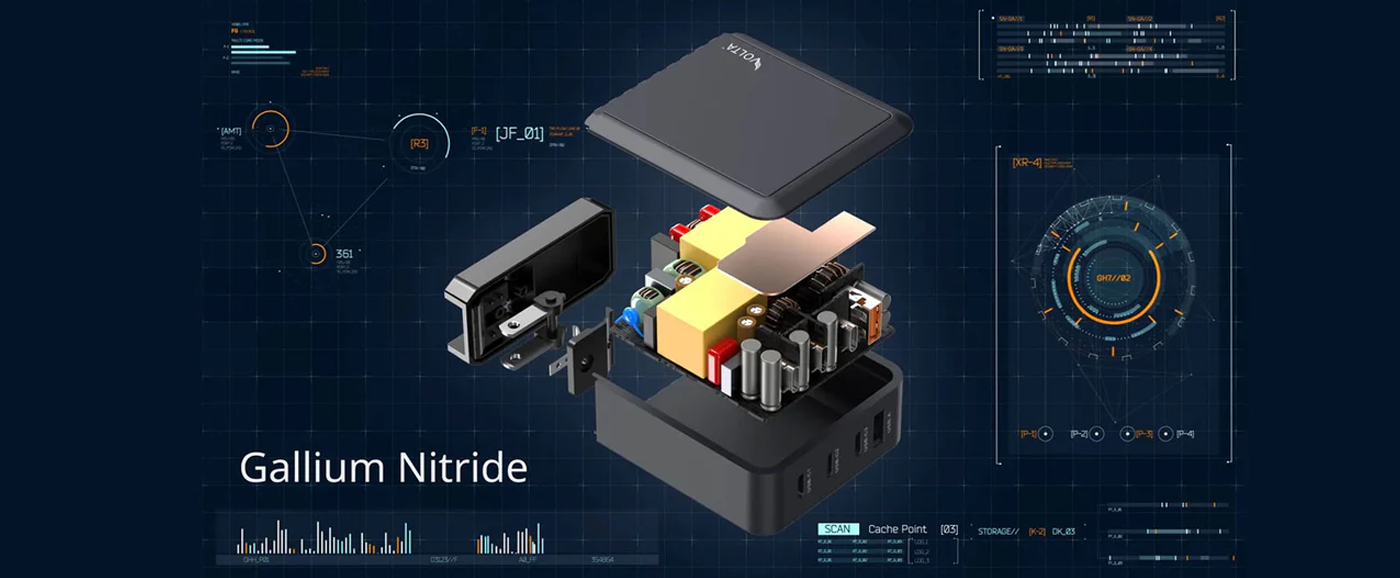
Gallium Nitride (GaN) is a crystal-like semiconductor material. For decades, it was mostly used in specialized applications like LED lights, military radar systems, and aerospace satellites. Over the last few years, however, engineers figured out how to reliably manufacture GaN chips for consumer electronics. When used inside a power adapter, a GaN semiconductor is significantly more efficient at conducting electrons than the silicon chips that have powered our electronics for the last fifty years.
The Physics of GaN: What is a "Wide Bandgap" and Why Silicon is Dying
To understand why Gallium Nitride (GaN) is revolutionary, you have to look at a fundamental concept in quantum physics called the bandgap. This is the energy barrier that electrons must cross to conduct electricity and safely power your devices.
Traditional Silicon: Has a restrictive bandgap of 1.12 eV (electron volts). Because this barrier is low, silicon components cannot handle extreme electrical frequencies or high voltages without overheating.
Gallium Nitride (GaN): Boasts a massive 3.4 eV Wide Bandgap. Because it takes more energy to force electron breakdown, GaN can handle significantly higher electrical currents and switch power on and off up to 10 times faster than silicon.
Because GaN switches electricity at blistering frequencies, it requires drastically smaller internal transformers and inductors. Hence, you get 95% power conversion efficiency crammed into a housing half the size of an old Apple or Samsung silicon brick.
Efficiency Comparison: Losing Less Energy as Heat
The fundamental issue with traditional silicon chargers is electrical resistance, which generates heat. Every time an electrical current passes through a silicon component, a noticeable percentage of that power is lost purely as thermal waste. GaN components possess far lower resistance. When current flows through Gallium Nitride, a significantly higher percentage of that electricity is transferred directly to your device. Because very little energy is lost as heat, the charger stays remarkably cool to the touch even when pushing maximum wattage.
The Real-World Example: 140W in the Size of a 45W Charger
To put this into perspective, think about the classic massive, heavy power bricks that came with older laptops, which typically pushed around 45W to 65W of power. Today, a modern high-quality GaN charger can output a staggering 140W of power, enough to fast-charge a 16-inch MacBook Pro from 0 to 50% in under 30 minutes. All while being the exact same physical size as an old 45W block. This represents more than triple the power density in the palm of your hand.
GaN Charger vs Regular Charger: Side by Side
When you place a standard silicon charger next to a modern GaN adapter, the differences are immediately apparent. Below is a breakdown of how the two technologies compare across key metrics.
|
Who Actually Needs a GaN Charger
While GaN technology is undoubtedly superior to older silicon designs, not every single person needs to rush out and upgrade immediately. However, if you fall into one of the following categories, a high-wattage GaN adapter is arguably the best tech accessory you can buy this year.
Remote Workers and Digital Nomads: One Charger for Everything
If your daily routine involves working from coffee shops, co-working spaces, or temporary setups, outlet availability is often a massive bottleneck. A high-wattage GaN adapter with multiple ports completely eliminates this issue. Instead of hunting for three separate wall sockets, you plug one block into the wall and connect your laptop, phone, and wireless earbuds simultaneously. It declutters your workspace, ensures you are always ready to move, and keeps your gear fully powered without the mess of multiple bulky bricks.
Frequent Travelers: Reduces Bag Weight and Adapter Count
Anyone who travels frequently understands the premium placed on backpack space and weight. Traditional silicon chargers are heavy, and carrying three of them (for a laptop, tablet, and phone) adds completely unnecessary bulk to a carry-on. A multi-port GaN charger consolidates all of your power needs into a single, lightweight cube. Furthermore, high-end GaN chargers are designed to handle global voltage standards (100V-240V), meaning you just need a simple plug adapter to travel internationally without worrying about frying your electronics.
MacBook and Laptop Users: Most Laptops Now Need USB-C PD
The transition to USB-C Power Delivery (PD) is fully complete in 2026. Most modern laptops, including the entire MacBook lineup, Dell XPS series, and Lenovo ThinkPads — require high-wattage USB-C inputs to charge while in active use. An older 30W silicon brick simply will not provide enough juice to keep a modern laptop running if you are rendering video, compiling code, or running multiple heavy applications. A 100W or 140W GaN charger provides the massive power headroom these machines demand.
Anyone With 3 or More USB-C Devices
If your household or daily carry bag contains a phone, a tablet, a smartwatch, and wireless headphones, you are already dealing with a tangle of cords and chargers. A GaN charger with three or four USB-C ports acts as a centralized power hub. Smart power distribution inside the charger ensures that if you plug your tablet and phone in simultaneously, both receive the optimal fast-charging wattage without any guesswork on your part.
Who Doesn't Need to Upgrade Yet
Despite the tremendous benefits, GaN is a premium technology that carries a higher upfront cost. There are two specific groups who should hold off on upgrading.
People Who Only Charge a Phone With a 20W Brick
If your entire technology ecosystem consists of a single smartphone, and you charge it overnight on your nightstand using the basic 20W brick that you've had for years, GaN is completely unnecessary for you. At lower wattages like 20W, the size and heat differences between GaN and silicon are negligible. You won't notice a faster charge, and you won't save significant space. Stick with what you have until you purchase larger devices.
Budget-First Buyers
High-quality GaN chargers are sophisticated pieces of engineering. If you are strictly on a tight budget, it is better to wait. The absolute minimum worth buying is a reputable 65W GaN adapter, which still demands a price premium over standard chargers. Buying ultra-cheap, unbranded "GaN" chargers from generic marketplaces is highly discouraged; poor internal circuitry can damage your expensive electronics. If you cannot afford a reputable brand right now, stick to your standard silicon chargers.
2026 Premium GaN Chargers Compared
Ugreen Nexode 300W Desktop Charger
Specs: 140W max single-port output | 300W total output | 5 charging ports (4x USB-C / 1x USB-A)
- The Good: The Nexode 300W is an absolute desktop powerhouse. It can effortlessly output a full 140W to fast-charge a 16-inch MacBook Pro while simultaneously supplying 100W and 60W to two other power-hungry laptops via its secondary ports. It also utilizes excellent continuous thermal monitoring to keep temperatures stable.
- The Bad: It is completely impractical for travel. It is a heavy desktop charging station that requires an external 6.5-foot thick AC power cord, making it a bulky nightmare to pack into a standard travel backpack or sleek briefcase.
Anker Prime 100W GaN Wall Charger
Specs: 100W max output | 3 charging ports (2x USB-C / 1x USB-A) | ActiveShield 2.0
- The Good: Built with a premium, sleek finish, the Anker Prime 100W features an improved center of gravity and textured prongs to prevent it from slipping out of loose wall sockets. It handles single-device phone and tablet charging excellently and dynamically splits power across triple-port layout.
- The Bad: It maxes out at the older USB Power Delivery 3.0 baseline. Because it completely lacks 140W PD 3.1 capability, it cannot fast-charge a 16-inch MacBook Pro at maximum velocity, leaving your high-end professional hardware throttled below its actual speed threshold.
INIU A11 100W GaN Charger
Specs: 100W max output | 3 charging ports (2x USB-C / 1x USB-A) | Budget Architecture
- The Good: The INIU A11 offers an incredibly affordable price point for a triple-port 100W hub. It serves as a decent entry-level charger for users who just need to slow-charge a small laptop alongside standard phone accessories.
- The Bad: Its internal power efficiency is noticeably lower than premium tier GaN builds. It exhibits high thermal resistance, causing the plastic casing to run uncomfortably hot to the touch under a sustained laptop charging workload, which can degrade your device's battery health over time.
Anker Nano II 65W
Specs: 65W max output | 1 charging port (1x USB-C) | Ultra-Compact Build
- The Good: The Nano II is remarkably small, shrinking down to the size of a standard smartphone wall plug. For a single device like an iPad or a smartphone, it provides a fast, reliable, pocketable charging solution.
- The Bad: Complete lack of utility. With only a single USB-C port, it forces you to pack multiple separate wall chargers if you want to power up your laptop, wireless earbuds, and smartwatch simultaneously while traveling.
Tessan 65W Universal Travel Adapter
Specs: 65W max USB output | Multi-Plug Global Slider Grid | All-in-One Passive Housing
- The Good: It acts as a great multi-country physical shape-shifter, allowing you to slide out mechanical pins to match local wall outlets across Europe, the UK, and Asia.
- The Bad: It is incredibly underpowered for modern creative workflows. The built-in GaN circuits splits its 65W pool so heavily among its auxiliary USB slots that plugging in a phone instantly starves your laptop of power, forcing slow-charging speeds. It also lacks advanced independent surge isolations.
The Recommended Pick: Volta 140W Giga GaN Charger
Specs: 140W native single-port output | 3 charging ports (2x USB-C / 1x USB-A) | Full PD 3.1 & PPS Fast Charging
Why it Wins
The Volta 140W Giga GaN is the ultimate compromise-free winner for travelers and power users alike. By fully integrating advanced USB Power Delivery 3.1 architecture, it pushes a true, unthrottled 140W directly from its primary port, allowing it to fast-charge a 16-inch MacBook Pro from 0% to 56% in just 30 minutes.
Unlike bulky desktop hubs, it packs this massive power grid into a highly portable, pocket-sized wall plug. Equipped with dynamic Programmable Power Supply (PPS) chips, it automatically unlocks Samsung's Super Fast Charging 2.0 speeds, making it the most mathematically efficient, future-proof travel block on the market
What to Look For in a GaN Charger
Not all GaN chargers are created equal. The market is saturated, and knowing exactly what specifications matter will prevent you from buying a device that underperforms. Here is the checklist you need to follow.
Wattage Constraints: Sizing Your Power Needs
Wattage dictates how fast your devices will charge and whether the adapter can power multiple items at once.
- 65W: The absolute minimum. Good for fast-charging phones and handling a lightweight tablet or ultrabook laptop.
- 100W: The sweet spot for most professionals. Easily handles a 13-inch or 14-inch laptop alongside a smartphone.
-
140W: The top tier. Required if you want to fast-charged a 16-inch MacBook Pro or power three high devices simultaneously.

Port Count: At Least 2 USB-C Ports
A single-port GaN charger entirely defeats the purpose of consolidating your gear. At a minimum, look for a charger with two USB-C ports. For maximum flexibility, a configuration of three USB-C ports and one USB-A port is ideal, as it covers modern fast-charging while maintaining backward compatibility for older legacy cables or accessories like smartwatches.
Smart Power Distribution
High-end GaN chargers feature internal intelligence. When you plug in a laptop requiring 65W and a phone requiring 20W, the charger must intelligently divide its total output pool to safely feed both devices what they need. Look for chargers that explicitly advertise "Dynamic Power Allocation" or "Smart Power Distribution." Without this, a charger might default to a low output across all ports, resulting in agonizingly slow charging times.
Global Voltage Support for Travel
A true travel adapter must support universal voltage inputs. Look at the fine print on the charger to ensure it reads Input: 100-240V ~ 50/60Hz. This ensures that whether you are plugged into a 110V socket in New York or a 220V socket in London, the internal components will safely regulate the power without exploding.
The Volta GIGA GaN Charger: Where It Fits
When evaluating the premium end of the GaN market in 2026, the 140W category is where the most significant innovations are happening. The Volta GIGA GaN charger represents the current apex of this specific tier, directly addressing the exact pain points of heavy device users.
140W in a Remarkably Compact Form

Pushing 140 watts via the PD 3.1 protocol allows the Volta GIGA to take a 16-inch MacBook Pro from dead to 50% battery in merely 30 minutes. Despite this massive throughput, the device itself has a footprint of roughly 75mm, comfortably fitting into the palm of your hand or sliding into a slim laptop sleeve without creating a massive bulge.
Visual Intelligence: The Smart Display
One of the most frustrating aspects of multi-port charging is not knowing whether a device is actually pulling the fast-charge wattage it needs. The Volta GIGA solves this entirely with a built-in color LCD smart display. This screen provides real-time, visual intelligence, showing you the exact, precise wattage being delivered to every single port in use simultaneously, alongside the internal temperature of the charger itself.
The 2x USB-C Plus 1x USB-A Configuration
Volta opted for a highly practical three-port configuration. Two high-bandwidth USB-C ports handle the heavy lifting for laptops and modern tablets, while a single USB-A port remains available for legacy devices. The internal smart chip perfectly balances the 140W total pool across these three ports dynamically, protecting battery health by automatically cutting power when a device hits 100%.
Built for Global Travel (100V to 240V)
The Volta GIGA is built with a 100V to 240V wide voltage range, and crucially, it includes interchangeable plug pins for US, UK, EU, and AU markets right in the box. This completely eliminates the need to buy a secondary, bulky travel adapter just to make your charger fit into a foreign wall socket.
Frequently Asked Questions
1. Does a GaN charger damage my phone battery?
No. A high-quality GaN charger is actually safer for your battery than a cheap silicon brick. Modern GaN chargers use intelligent power delivery chips that communicate with your device. If you plug a phone that only accepts 20W into a 140W GaN charger, the charger will only deliver exactly 20W. Furthermore, the reduced heat output of a GaN charger minimizes thermal stress on the internal components.
2. Can I use a GaN charger on an airplane?
Yes. GaN chargers are perfectly safe and approved for use on airplanes. In fact, their compact size makes them far more convenient for the tight, recessed power outlets often found beneath airplane seats. Because they support wide voltage ranges, they adapt perfectly to the fluctuating power outputs on aircraft.
3. Why do my devices briefly stop charging when I plug a new one in?
This is a feature, not a bug. When you connect a second or third device to a multi-port GaN charger, the internal smart chip has to momentarily pause the current to re-calculate and re-distribute the total available wattage safely across all active ports. This "handshake" takes about two seconds and prevents any device from receiving an unexpected power surge.
4. Is a 140W GaN charger faster than a 65W GaN charger?
It depends entirely on your device. If your laptop requires 100W of power, a 140W charger will charge it significantly faster than a 65W charger. However, if you are only charging an iPhone that maxes out at roughly 27W, both the 65W and the 140W chargers will charge the phone at the exact same speed. The primary benefit of 140W is the ability to charge high-draw devices or charge multiple devices at their maximum speeds simultaneously.
5. Do I need a special cable to use a GaN charger?
Yes, if you want the maximum benefit. If you purchase a 140W GaN charger but use a cheap, standard USB-C cable rated for only 60W, your charging speed will be permanently capped at 60W. To utilize the full speed of a modern GaN adapter, you must ensure you pair it with a cable specifically rated for 100W or 140W (PD 3.1 EPR).




Leave a comment
This site is protected by hCaptcha and the hCaptcha Privacy Policy and Terms of Service apply.