



- Section 1: The Real Reasons USB-C Ports Wear Out
- Section 2: How Cables Fray and What to Look For
- Section 3: Daily Habits That Damage Your Port Without You Knowing
- Section 4: How to Clean Your Charging Port Safely
- Section 5: The Magnetic Solution, How Magnetic Cables Protect Ports Permanently
- Section 6: When to Replace Your Cable vs Your Charger
- Frequently Asked Questions (FAQ)
- Conclusion
Experienced this? You plug your phone in before going to sleep, expecting to wake up to a full 100% battery, only to discover it stopped charging five minutes after you set it down. Or perhaps you are currently dealing with the infamous "cable dance" wiggling, bending, and propping your charging cable at a very specific 45-degree angle just to get the charging icon to appear.

It is incredibly frustrating.
Yet, despite how heavily we rely on our mobile devices, the small physical connections that keep them alive, our charging ports and cables are often the most neglected and abused components of our tech ecosystem.
Why do these essential accessories fail faster than they should?
The truth is, charging components endure a massive amount of mechanical stress, environmental exposure, and daily wear and tear. Every time you plug and unplug your device, microscopic damage occurs.
Understanding the mechanics of this wear, and learning proper charging port damage prevention, can save you hundreds of dollars in replacement cables and expensive phone repairs.
In this comprehensive guide, we will dive deep into why USB-C ports break, how to protect your charging port, how to identify fraying cables before they become fire hazards, and the revolutionary magnetic solutions that can end your charging woes forever.
Section 1: The Real Reasons USB-C Ports Wear Out
When the tech industry widely adopted the USB-C standard, it was hailed as a massive leap forward. It is reversible, capable of transferring massive amounts of data, and can deliver enough wattage to charge a laptop.
However, despite its impressive specifications, many users frequently find themselves wondering exactly why USB-C ports break or become loose over time.
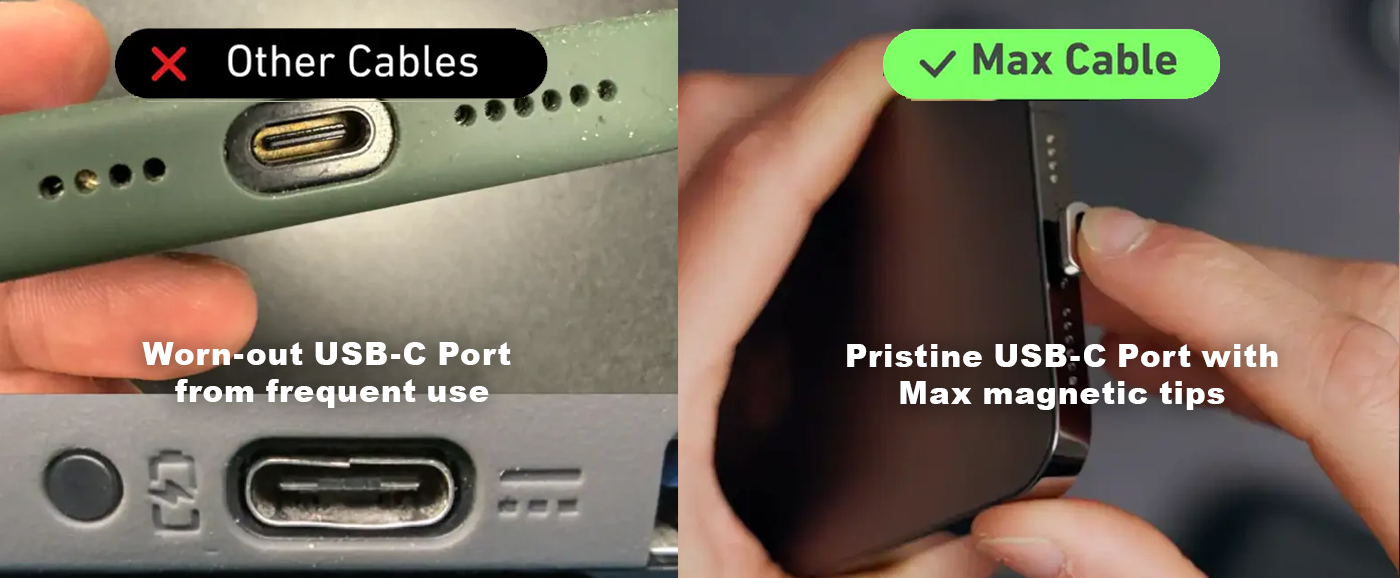
To understand the vulnerability, you have to look at the anatomy of the port itself. Unlike Apple's older Lightning port, which is essentially an empty cavity into which a solid plug is inserted, the USB-C port features a fragile, centrally located "tongue" or receptacle pad. This tiny wafer inside the port houses the 24 delicate pins required for data transfer and power delivery.
There are three primary reasons this robust-looking port eventually wears out:
1. Mechanical Fatigue from Lateral Stress

Every time you insert a charging cable, the metal connector rubs against the internal pins. Over thousands of cycles, the friction naturally wears down the conductive plating. More importantly, if you move your phone while it is plugged in, you apply lateral (sideways) pressure to the connector. This acts like a tiny lever, bending the central tongue inside the USB-C port. Over time, this microscopic bending weakens the internal structure until the connection becomes loose and wobbly.
2. Environmental Debris and Compression
Your smartphone lives in a hostile environment: the bottom of your purse, the lint-filled depths of your jeans pocket, and the dusty console of your car. Every time you shove a charging cable into your phone, you are acting as a mini-compactor, ramming dust, lint, and grit deeper into the port. Eventually, this compressed layer of debris prevents the cable from seating properly, blocking the electrical connection.
3. Corrosion and Oxidation
Humidity, sweat, and the occasional splash of water can wreak havoc on the microscopic pins inside a USB-C port. When electricity flows through a damp port, it accelerates a process called galvanic corrosion. This literally eats away at the metal contacts. Even if you dry your phone, the microscopic oxidation layer left behind acts as an insulator, preventing your device from charging efficiently.
Section 2: How Cables Fray and What to Look For
When you ask the common question, "how long do charging cables last?", the answer is frustratingly variable. A high-quality cable used carefully at a desk might last three to five years. However, a standard rubberized cable shoved in and out of backpacks and used in bed might barely survive six months.
The death of a charging cable rarely happens overnight. It is a slow, progressive degradation that usually starts at the most vulnerable point: the strain relief.
The strain relief is the slightly thicker, flexible collar where the connector head meets the wire. Its entire job is to absorb the stress of bending so the fragile copper wires inside do not snap. However, cheap materials, often standard PVC, degrade quickly under continuous flexing.
Here is exactly what to look for to determine if your cable is on its last legs:
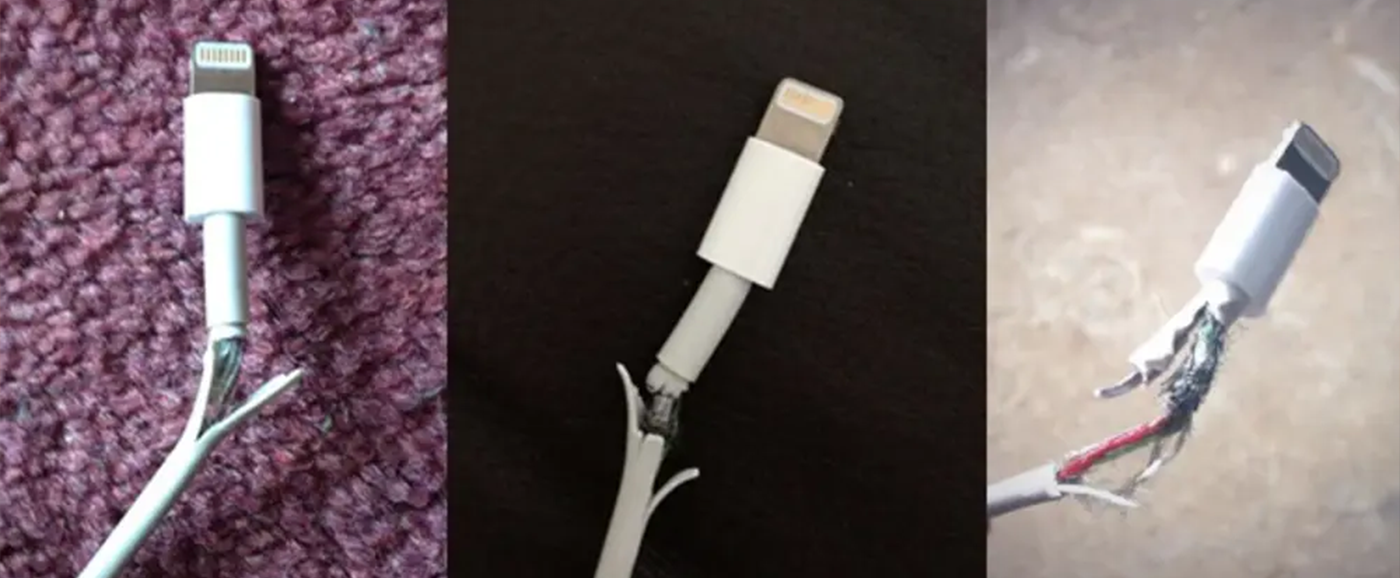
Turtlenecking at the Strain Relief: The most common early sign of failure is the plastic casing bunching up or pulling away from the connector head. It looks like the cable is wearing a loose turtleneck sweater. This exposes the inner shielding to the elements.
Visible Braiding or Copper: If you can see silver braided shielding or, worse, raw copper wire, stop using the cable immediately. This is no longer just an annoyance; it is a fire hazard and a fast track to short-circuiting your device.
Kinks and Permanent Bends: Cables are designed to loop naturally. If your cable has sharp kinks that won't smooth out, the internal wires have likely snapped or stretched beyond their elastic limit.
Intermittent Connection: If you have to wiggle the cable to make it charge, the internal copper strands are broken. They only make a connection when forced into a specific position.
If you are experiencing random disconnections but your cable looks perfectly fine on the outside, there might be a deeper software or hardware issue at play. For a deeper dive into diagnosing sudden charging failures, check out our dedicated guide on Why your phone stops charging.
Section 3: Daily Habits That Damage Your Port Without You Knowing
You might think you treat your electronics with care, but some of the most common smartphone habits are actually destroying your charging components in slow motion. Charging port damage prevention isn't just about buying better gear; it is about changing how you interact with your device.
Here are the daily habits that are secretly ruining your charging ports:
1. The "Using While Charging" Maneuver
We all do it. You are binge-watching a show or deeply engaged in a mobile game, and your battery drops to 5%. You plug it in and keep playing. The problem? As you hold the phone, the cable is resting against your chest, your pinky finger, or your lap. This constant, shifting pressure puts immense strain on both the cable's connector and the internal pins of your port. It is the number one cause of loose USB-C and Lightning ports.
2. The Yank and Pull
When you are done charging, how do you unplug your phone? Do you grip the hard plastic connector head and pull straight out? Or do you grab the cable's wire a few inches down and yank it? Yanking from the cord places massive stress on the solder joints inside the connector head, practically guaranteeing a frayed cable in a matter of months.
3. The Bedside Trap

Plugging your phone in and dropping it off the side of your bed or nightstand leaves the heavy cable dangling in the air. Gravity pulls the cable down, creating a sharp 90-degree bend right at the connection point. Worse, if the cable drops to the floor and you trip over it in the dark, the violent pull can literally rip the charging port off your phone's internal motherboard.
4. Ignoring Pocket Lint
Putting your phone in your pocket with the charging port facing downward is a recipe for disaster. Every step you take forces fabric fibers into the port. Over weeks and months, this creates an impenetrable wall of lint. When people force their chargers into these dirty ports, they bend the internal pins trying to make a connection.
Section 4: How to Clean Your Charging Port Safely
When learning how to protect a charging port, the most immediate and practical skill you can acquire is safe cleaning. More often than not, a "broken" port is just a filthy port. However, cleaning it incorrectly can instantly transform a minor dust problem into a permanent, expensive hardware failure.
What NOT to use:
Never, under any circumstances, stick anything metal into your charging port. Needles, safety pins, paperclips, and tweezers are absolute no-gos. Metal conducts electricity, meaning you could easily short out the pins, permanently frying the motherboard. Furthermore, metal is harder than the fragile gold-plated contacts inside the port; you will scrape the plating off, ruining the connection forever.
The Safe Cleaning Method:
1. Power Down: Always turn your phone completely off before performing any maintenance on the charging port.
2. Illuminate the Area: Get a bright flashlight or use the flash on a friend's phone to look deep into the port. You will likely see a gray or black mass compacted at the very bottom.
3. Use a Wooden or Plastic Tool: The best tool for the job is a wooden toothpick. If the toothpick is too thick, carefully shave it down with a knife until it is thin enough to fit easily. Alternatively, a specialized anti-static plastic spudger works perfectly.
4. The Gentle Sweep: Insert the tip of the toothpick into the port, keeping it pressed against the outer wall (avoid the central tongue in USB-C ports). Gently scrape the bottom of the port in a sweeping motion. You are trying to hook the lint and pull it out, not push it deeper.
5. Compressed Air (With Caution): Once you have loosened the big chunks of lint, use a can of compressed air to blow out the remaining dust. Crucial rule: Keep the can perfectly upright. If you tilt it, freezing liquid propellant will shoot into your phone, potentially causing liquid damage. Use short, controlled bursts from an inch away.
After a thorough cleaning, your cable should slide in effortlessly and end with a satisfying "click." If your port is clean but your phone still refuses to hold a charge, it might be time to investigate further. Read our article on How to know if your iPhone charging port is faulty to rule out serious hardware damage.
Section 5: The Magnetic Solution, How Magnetic Cables Protect Ports Permanently
If you are tired of dealing with frayed cables, compressed lint, and the constant fear of tripping over cords, there is a modern, foolproof solution: magnetic charging cables.
Magnetic charging systems fundamentally change how power is delivered to your device, completely bypassing the physical wear and tear that plagues traditional cables. When you adopt a magnetic system, you take a massive leap in charging port damage prevention. Here is how they work and why they are the ultimate fix.
The Mechanics of Magnetic Charging
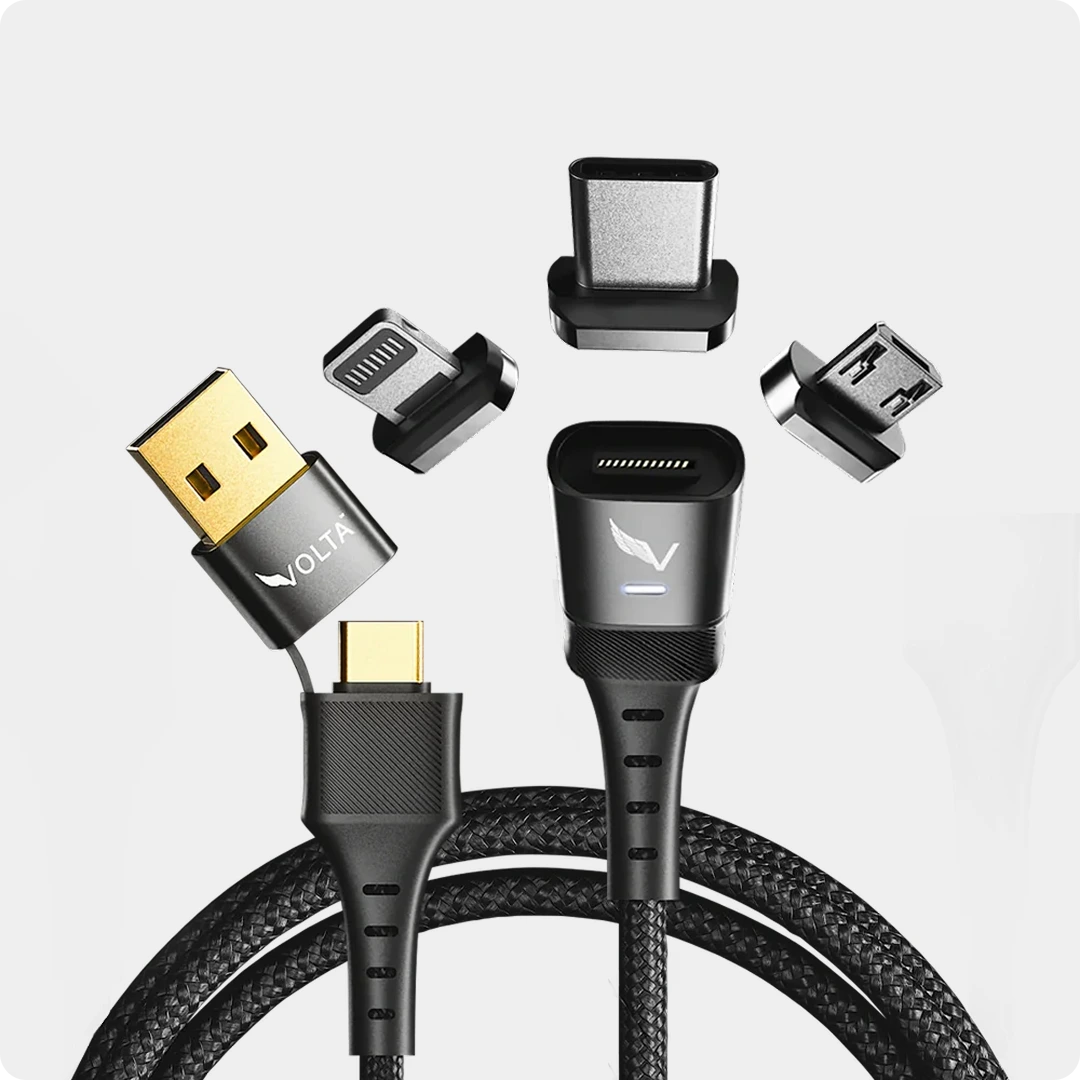
A magnetic charging system consists of two parts: a tiny magnetic adapter tip (which plugs into your phone's charging port) and the cable itself, which features a magnetic end. You insert the tiny tip into your phone once, and you leave it there permanently. When you want to charge your phone, you simply bring the cable close to the tip, and powerful neodymium magnets snap the two pieces together instantly.

Why Magnetic Cables Protect Your Ports:
Zero Insertion Wear: Because the magnetic tip stays inside your phone permanently, you are no longer plugging and unplugging a cable multiple times a day. The wear and tear on the internal pins of your USB-C or Lightning port drops to exactly zero.
The Ultimate Dust Plug: The permanent magnetic tip seals your charging port from the outside world. Lint, dust, dirt, and pocket sand can no longer enter the cavity, completely eliminating the need for toothpick cleaning sessions.

Trip-Safe Technology: This is perhaps the greatest benefit. If a pet runs by, or you trip over your charging cable in the dark, a standard cable acts as a tether, violently pulling your phone off the table and potentially ripping the port apart. A magnetic cable, however, simply breaks away cleanly. The magnets disconnect harmlessly, leaving your phone safely on the table and your port entirely undamaged.

Universal Compatibility: High-quality magnetic systems feature interchangeable tips. You can put a USB-C tip in your Android phone, a Lightning tip in your older iPad, and a Micro-USB tip in your wireless headphones, and use the exact same magnetic cable to charge all of them.

If you are ready to permanently protect your devices, this is the way to go. Explore the revolutionary Volta MAX Cable product page for a virtually indestructible charging solution, or check out the Volta Mag Adapter product page to convert your existing high-quality cables into breakaway magnetic powerhouses.
Section 6: When to Replace Your Cable vs Your Charger
Sometimes, the port is clean, the phone is fine, but the device simply isn't charging as fast as it used to or at all. In these moments, you need to diagnose whether the failure lies in the cable or the charging brick (the wall adapter).
Signs Your Cable is Dead:
As discussed in Section 2, visual damage like exposed wires or intense fraying means the cable belongs in the trash. However, internal breaks are invisible. The easiest way to test a cable is the isolation method. Take your suspect cable and plug it into a different wall charger, or into a computer's USB port. If the phone still won't charge, or the connection is highly intermittent based on how you hold the wire, the cable has failed internally and must be replaced.
Signs Your Charging Brick is Failing:
Wall chargers are generally more robust than cables because they do not endure physical bending. However, their internal capacitors and transformers degrade over time due to heat.
Excessive Heat: If your charging brick feels too hot to hold comfortably, unplug it immediately. This is a sign of internal resistance and component failure.
Whining Noises: If your charger emits a high-pitched coil whine or a buzzing sound, the internal components are vibrating loose or failing. It is time for a replacement.
Slow Charging: If your fast-charging phone suddenly takes six hours to charge, the brick may no longer be outputting its proper wattage.
A critical safety note: If your phone is pushing the screen out of the frame, or the back glass is lifting, the issue is neither the cable nor the port. Stop charging immediately. You are dealing with a dangerous battery expansion issue. Learn more about the risks and what to do in our guide on iPhone battery bulging).
Frequently Asked Questions (FAQ)
1. How long do charging cables last on average?
The lifespan of a charging cable depends heavily on its material and how it is treated. A cheap gas-station cable might only last 3 to 6 months. High-quality braided nylon cables with reinforced strain relief can easily last 2 to 5 years. Magnetic cables, which do not suffer from insertion stress, can last significantly longer.
2. Is it safe to leave my charger plugged into the wall all the time?
Modern, high-quality chargers are designed with smart circuitry that stops drawing significant power when a device is not connected or when the device is fully charged. While leaving it plugged in uses a microscopic amount of "vampire" power, it is generally perfectly safe and will not significantly degrade the charger's lifespan. However, always unplug chargers that feel hot or make buzzing noises.
3. Can dust completely ruin a charging port?
Indirectly, yes. While the dust itself won't usually break the metal, the compression of the dust will. When you force a charging cable into a dust-filled port, you can bend or snap the internal contact pins trying to push past the debris. Once those pins are broken, the port must be physically replaced by a technician.
4. Why does my phone say 'moisture detected' in the port?
Modern smartphones have tiny sensors inside the charging port designed to prevent short circuits. If humidity, sweat, or a splash of water enters the port, the phone will disable charging to protect the motherboard. Do not blow hot air into it; instead, tap it gently against your hand with the port facing down to clear water, and leave it in a dry, well-ventilated area for a few hours.
5. Does fast charging damage the charging port or battery?
Fast charging does not damage the physical charging port. The port is designed to handle the required wattage. As for the battery, modern devices manage heat and voltage intelligently. The phone charges rapidly up to about 80% and then dramatically slows down the current to trickle-charge the remaining 20%, which protects the battery chemistry from heat degradation.
Stop Replacing Cables and Protect Your Tech Today
Constantly buying replacement cables and worrying about the health of your charging ports is a hassle you no longer have to endure. By understanding how to clean your devices, changing your daily habits, and upgrading your hardware, you can make your tech last years longer.

The smartest move you can make for your devices is upgrading to a magnetic charging ecosystem. It eliminates port wear, blocks dust, and saves your phone from accidental drops. Ready to make the switch? Check out the ultimate in durability on the Volta MAX Cable product page, or upgrade your current favorite cables with the brilliant Volta Mag Adapter product page. Protect your ports permanently and never deal with a frayed cable again!

Volta MAX Kabel
✅ Einfache magnetische Verbindung ✅ Einfach aufstecken und Ihr Handy, Ihren Laptop und mehr aufladen ✅ Lädt ALLE...


Hinterlasse einen Kommentar
Diese Website ist durch hCaptcha geschützt und es gelten die allgemeinen Geschäftsbedingungen und Datenschutzbestimmungen von hCaptcha.